Back to CNC Systems

Sherline/Acorn CNC Controller

The Sherline/Acorn CNC Controller is a fully integrated, plug-and-play control designed
for Sherline CNC machines and compatible third-party systems. It combines the industrial
Centroid Acorn CNC control with a custom Sherline housing, wiring, and connectors to
simplify installation, upgrades, and retrofits.

Centroid CNC, founded in 1979 in Howard, PA, produces high-performance, industrial-quality
CNC controls. The Acorn controller is an excellent upgrade for both new and older Sherline
CNC machines, including legacy systems originally supplied to OEMs such as Denford, D&M,
LabVolt, Paxton-Patterson, and Light Machines (Spectralight).

Controller Features

Custom control housing includes:

  • Centroid Acorn CNC control board
  • Acorn plug-and-play relay module (mounted and pre-wired)
  • Internal wiring to DB9, DB25, and 2-wire Molex connectors
  • Power supply, push-to-reset circuit breaker, and cooling fan
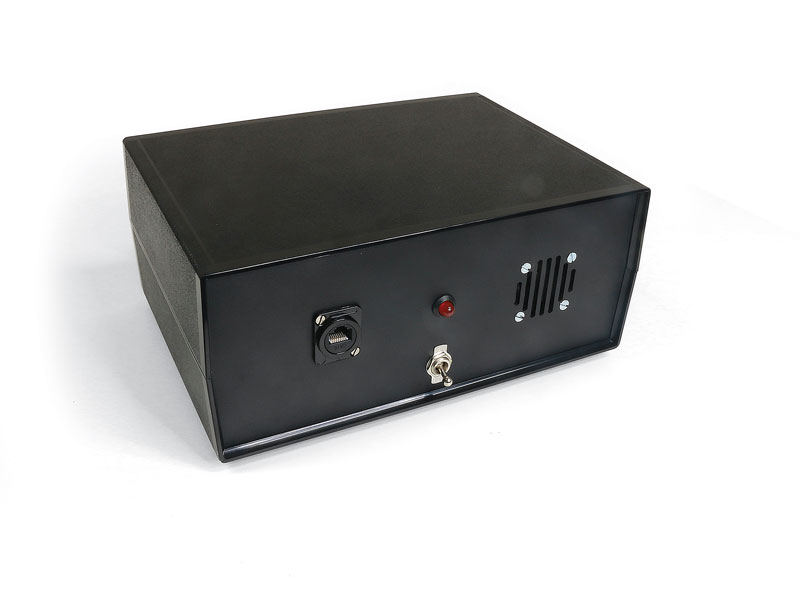
  • External Ethernet port, power switch, and power LED

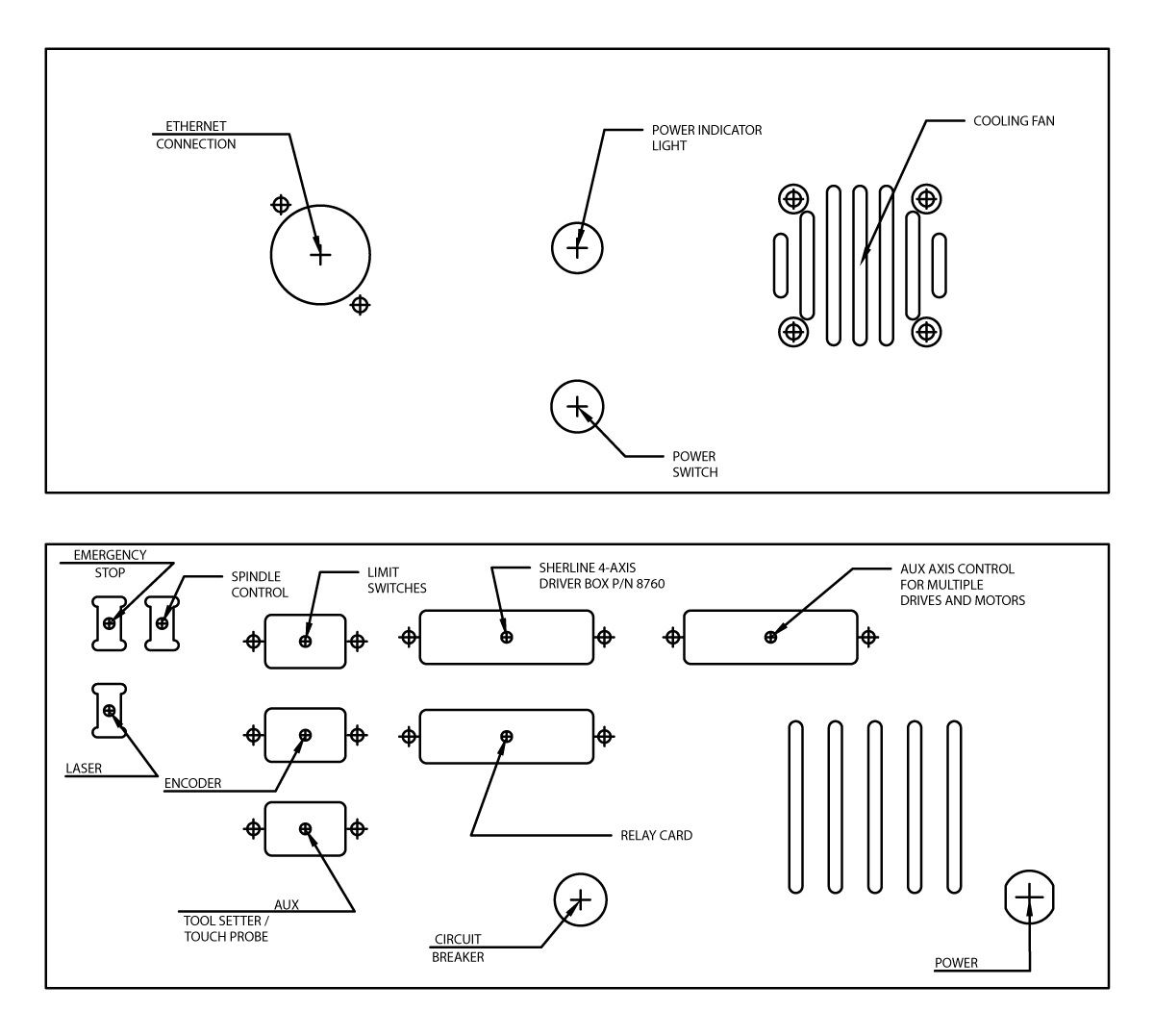
Front panel connections:

  • Ethernet connection
  • Power switch and power LED
  • Cooling fan

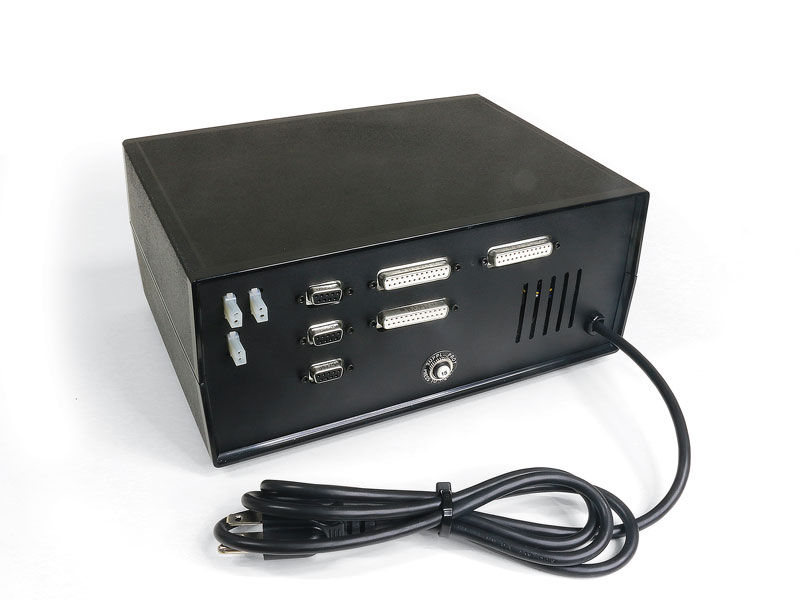
Rear panel connections:

  • Three DB25 connectors:
    • Sherline 4-axis driver box
    • Aux 4-axis control for additional drives/axes
    • Relay card
  • Three DB9 connectors:
    • Limit switches
    • External encoder*
    • Aux tool setter or touch probe (one at a time)
  • Three 2-wire Molex connectors:
    • E-stop button
    • Spindle control
    • Laser

Power & cabling:

  • Dual logic power: 5 VDC and 24 VDC
  • Input power: 100–120 VAC or 208–240 VAC, 50/60 Hz
  • 15 ft shielded Ethernet cable (controller to PC)
  • External E-stop with 2 ft cord

*For spindle speed-control information, see:
Sherline/Acorn Spindle Speed-Control Information
.

Compatibility & Connection Options
  • The controller connects directly to Sherline 24 V stepper motors via the Sherline
    4-axis driver box (P/N 8760).
  • Not compatible with MASSO 36 V closed-loop stepper motors.
  • For DIY users with their own motors/drives, use the “Aux 4-axis” DB25 connector.
    Wiring information for DIY customers is available under the Specifications/Downloads.

You can use the controller with or without limit switches.
CLICK HERE for more information on limit switch assemblies for Sherline lathes and mills
.

Software & Conversational CAM

A free version of Centroid CNC12 is included with each Acorn kit for initial setup.
However, it is strongly recommended that you purchase the Centroid
Acorn “Pro” CNC12 Software License to unlock full conversational CAM (Intercon).

Use the options below or visit:
CLICK HERE for Acorn “Pro” CNC12 Software License details

Intercon Conversational CAM:

  • Program directly from hand sketches or prints
  • Import DXF files and generate G-code without separate CAD/CAM
  • Ideal for new CNC users and those unfamiliar with traditional G-code programming

Recommended training videos:

Typical Use Cases

DIY Customer

  • Buys CNC-ready Sherline machines and installs their own motors, drives, and encoders.
  • Purchase the base Sherline/Acorn CNC Controller (P/N 9400) without options and wire to
    your own hardware.

CNC Upgrade Customer

  • Upgrading an existing Sherline CNC system including older OEM systems such as Denford,
    D&M, LabVolt, Paxton-Patterson, or Light Machines. For a sample Denford/Sherline Microlathe conversion using Acorn, see:
    Centroid Denford/Sherline Microlathe Conversion
  • If you already have a Sherline Linux PC or 4-axis driver box, configure the controller
    with:

    • Spindle Control Isolator Board
    • External Encoder kit for your headstock (Standard or 3C)

CNC Turnkey Customer

  • Wants a complete Sherline system: CNC-ready machine, 24 V stepper motors, 4-axis driver
    box, spindle control isolator board, and external encoder.
  • The Sherline/Acorn Controller is designed to support all of these configurations.

Additional documentation and support are available on the Centroid Community CNC Support Forum
.

Important Notes for Spindle Control
  • To control spindle speed via G-code, you must have a motor drive or the
    Spindle Control Isolator Board and an external encoder installed.
  • These components work together to accurately acquire and control spindle RPM.
  • If you do not include the Spindle Control Isolator Board at the time of purchase,
    adding it later will require returning the controller to Sherline for installation.
    Email orders@sherline.com for return instructions.

For detailed spindle control information, download:
Sherline/Acorn Spindle Speed-Control Information
.

Lead Time: Approximately 3 weeks

Clear selection
  • *4-Axis CNC Driver Box

    *Spindle Control Isolator Board

    *Encoder Pulley Mounting Option

    Reset options

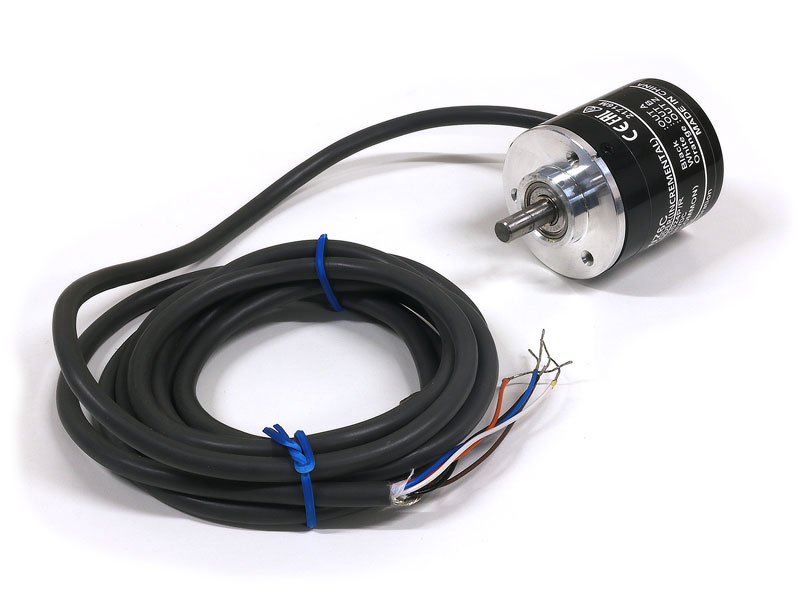
    Add the External Incremental Rotary Encoder

    Add Acorn "Pro" CNC12 Software License Upgrade

    NOTE: The software is board-specific.

-

Optional Add-ons

Part No.

Description


Driver Box:

8760

4-Axis CNC Driver Box
More info…


Spindle Control Isolator Board:

94310

Add the Spindle Control Isolator Board for spindle speed control.
More info…


External Encoder Pulley Mounting Kits:

Add the External Encoder Pulley Mounting Kit to your Sherline/Acorn CNC machine. The mounting kits include an encoder pulley (for your type of headstock) and headstock mounting hardware. The external incremental rotary encoder is an optional purchase. External encoders control the spindle speed via G-code on lathes and mills. On the lathe, it allows you to cut single point threads where the spindle speed and the feed rate are in sync.

For the Standard Morse #1 Headstock

9402

Add the external encoder pulley and mounting hardware for the Standard Headstock. The main spindle pulley has one high-speed pulley groove and can be used with the Standard Lever Collet Closer.
More info…

For the 3C Headstock

9404

Add the External Encoder encoder pulley and and mounting hardware for the 3C Headstock. The main spindle pulley has high-speed and low-speed (high-torque) pulley grooves and can be used with the 3C Lever Collet Closer.
More info…

For the Standard Morse #1 Headstock

9406

Add the External Encoder encoder pulley and and mounting hardware for the Standard Headstock. The main spindle pulley has high-speed and low-speed (high-torque) pulley grooves. However, it CANNOT be used with a Lever Collet Closer.
More info…


Acorn CNC Software

A free version of Centroid CNC12 is included with each Acorn kit for setup use. However, it is STRONGLY RECOMMENDED that you purchase the Centroid Acorn “Pro” CNC12 Software License. NOTE: The software is board-specific.


Acorn Mill Software

14457

Add the Acorn Mill “Pro” CNC12 Software License.
More info…

Acorn Lathe Software

14457

Add the Acorn Lathe “Pro” CNC12 Software License.
More info…

warning-symbol
The improper use of machine tools and their accessories can result in serious injury. Before using this tool, thoroughly read the instructions and make sure you understand its proper and safe use.

safety-glasses-symbol

Always wear safety glasses when operating machine tools.

Download the Sherline/Acorn CNC Control Quick Start Reference instructions

BEGIN HERE FIRST! Read our Sherline/Acorn CNC Control Quick Start Reference instructions first, since they go over how to connect everything on our Sherline control. The Centroid Quick Start is a generic quick start.

Instructions PDF Download

Acorn CNC Controller Quick Start Guide
The Centroid Acorn CNC controller Installation and start-up guide includes written instructions, links, and videos to help get you up and running with your Acorn CNC controller.

Centroid Community CNC Support Forum
The Centroid Community CNC Support Forum is a complete list of Acorn CNC Controller documentation.

Part No. Description Quantity
9400 Acorn CNC Controller 1
9410 E-stop 1
87825 Main Limit-Switch Cable 1
87837 6-foot Connection Cable 1
87839 1-foot Speed-Control Pig Tail Cable 1

Laser Marking a Ceramic Tile w/ the Acorn Controller

Laser Marking the Sherline 50th Anniversary Logo

Machining a Knife Handle w/the Acorn Controller

How to Install an Acorn CNC12 License

Auto Z Zero and Tool Setting

Centroid CNC Control User Training Video: CNC Millling Machine

Centroid DXF Import Using Intercon Conversational Software

Centroid Acorn Lathe Conversational Programming Primer

Sherline with 8760 Driver Box and Speed Control Board Schematics

Download PDF Diagram of the Acorn Lathe Connection Configuration
Download the Acorn Mill Lathe Connection Config with Rotary Encoder instructions
Download PDF Diagram of the Acorn Mill Connection Configuration w/Tool Setter
Download PDF Diagram of the Acorn Mill Connection Configuration w/Touch Probe
Download PDF Diagram of the Laser Connection to Acorn Board in Sherline/Acorn Control
Download PDF Diagram of the Acorn to Sherline Wiring
Download PDF Diagram of the DB25 Crossover Cable for Acorn to 8760 Driver Box

DIY Schematics

Download PDF Diagram of the Acorn Back-Panel Configuration for DB9 and DB25 Connectors
Download PDF Diagram of the Connecting Acorn to the G540 Gecko 4-Axis Driver
Download PDF Diagram of the Connecting Acorn to the G540 Gecko Driver for the Opt Laser
Download PDF Diagram of the Connecting Acorn to the 201 Gecko 4-Axis Driver
Download PDF Diagram of the Connecting Acorn to the 201 Gecko Driver for a 10w Laser