The ball screw benchtop lathe is a reimagined version of our popular 17″, 4400-series lathe. The lathe has a new solid aluminum base, which creates a very rigid assembly, a beefed-up saddle to accommodate the ball screws, and a larger 8″ crosslide. Please note that our ball screws only come in a metric pitch.
The MASSO G3 CNC controller, power supply, stepper motors, cable system and optical encoder are sold as a part of our Accu-Pro line of machines and are not available for purchase separately or as an upgrade option to existing machines.
Important Update Regarding Sherline Products
October 20, 2026
We would like to share an encouraging development regarding the future of Sherline Products.
We are currently in discussions with an American manufacturer regarding the potential purchase of Sherline’s intellectual property and remaining inventory. The goal of this proposed acquisition is to preserve and revitalize the Sherline brand while providing continued availability of replacement parts, accessories, and machines for our valued customers.
As these discussions progress, we have agreed to temporarily suspend accepting new orders, effective October 19, 2026. This will allow us to preserve our remaining inventory while negotiations are underway.
Although no final agreement has been reached, we are hopeful that this opportunity will provide a positive path forward for the Sherline name and the customers who have trusted our products for more than five decades.
We sincerely appreciate your patience, understanding, and continued loyalty during this transition. We will share additional information as soon as it becomes available.
Our greatest hope is that the Sherline legacy of quality, precision, and American craftsmanship will continue for generations to come.
Karl Rohlin III and Charla Papp
Co-Owners, Sherline Products, Inc.
October 20, 2026
We would like to share an encouraging development regarding the future of Sherline Products.
We are currently in discussions with an American manufacturer regarding the potential purchase of Sherline’s intellectual property and remaining inventory. The goal of this proposed acquisition is to preserve and revitalize the Sherline brand while providing continued availability of replacement parts, accessories, and machines for our valued customers.
As these discussions progress, we have agreed to temporarily suspend accepting new orders, effective October 19, 2026. This will allow us to preserve our remaining inventory while negotiations are underway.
Although no final agreement has been reached, we are hopeful that this opportunity will provide a positive path forward for the Sherline name and the customers who have trusted our products for more than five decades.
We sincerely appreciate your patience, understanding, and continued loyalty during this transition. We will share additional information as soon as it becomes available.
Our greatest hope is that the Sherline legacy of quality, precision, and American craftsmanship will continue for generations to come.
Karl Rohlin III and Charla Papp
Co-Owners, Sherline Products, Inc.
- Centroid Acorn CNC control board
- Acorn plug-and-play relay module (mounted and pre-wired)
- Internal wiring to DB9, DB25, and 2-wire Molex connectors
- Power supply, push-to-reset circuit breaker, and cooling fan
- External Ethernet port, power switch, and power LED
- Ethernet connection
- Power switch and power LED
- Cooling fan
- Three DB25 connectors:
- Sherline 4-axis driver box
- Aux 4-axis control for additional drives/axes
- Relay card
- Three DB9 connectors:
- Limit switches
- External encoder*
- Aux tool setter or touch probe (one at a time)
- Three 2-wire Molex connectors:
- E-stop button
- Spindle control
- Laser
- Dual logic power: 5 VDC and 24 VDC
- Input power: 100–120 VAC or 208–240 VAC, 50/60 Hz
- 15 ft shielded Ethernet cable (controller to PC)
- External E-stop with 2 ft cord
- The controller connects directly to Sherline 24 V stepper motors via the Sherline 4-axis driver box (P/N 8760).
- Not compatible with MASSO 36 V closed-loop stepper motors.
- For DIY users with their own motors/drives, use the “Aux 4-axis” DB25 connector. Wiring information for DIY customers is available under the Specifications/Downloads.
- Program directly from hand sketches or prints
- Import DXF files and generate G-code without separate CAD/CAM
- Ideal for new CNC users and those unfamiliar with traditional G-code programming
- Buys CNC-ready Sherline machines and installs their own motors, drives, and encoders.
- Purchase the base Sherline/Acorn CNC Controller (P/N 9400) without options and wire to your own hardware.
- Upgrading an existing Sherline CNC system including older OEM systems such as Denford, D&M, LabVolt, Paxton-Patterson, or Light Machines. For a sample Denford/Sherline Microlathe conversion using Acorn, see: Centroid Denford/Sherline Microlathe Conversion
- If you already have a Sherline Linux PC or 4-axis driver box, configure the controller
with:
- Spindle Control Isolator Board
- External Encoder kit for your headstock (Standard or 3C)
- Wants a complete Sherline system: CNC-ready machine, 24 V stepper motors, 4-axis driver box, spindle control isolator board, and external encoder.
- The Sherline/Acorn Controller is designed to support all of these configurations.
- To control spindle speed via G-code, you must have a motor drive or the Spindle Control Isolator Board and an external encoder installed.
- These components work together to accurately acquire and control spindle RPM.
- If you do not include the Spindle Control Isolator Board at the time of purchase, adding it later will require returning the controller to Sherline for installation. Email orders@sherline.com for return instructions.
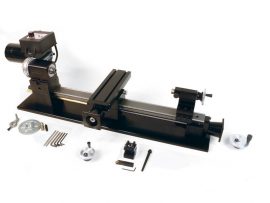
17″ Ball Screw Benchtop Lathe
17″ Ball Screw Benchtop Lathe is a precision-engineered, CNC-ready 17-inch benchtop lathe built on a rigid aluminum base with ball screw feeds for superior accuracy and repeatability. It’s a modern reimagining of Sherline’s classic 4400 series, featuring beefed-up slides and stepper-motor mounts, and is designed to integrate seamlessly with CNC controllers and stepper motors for advanced machining projects.
2 to 4-week lead time
Please note that our ball screws only come in a metric pitch
Ordering options:
Use the selections in the drop-down menus below to configure your machine. (For more information on the configuration options and accessory packages please see the options tab below)
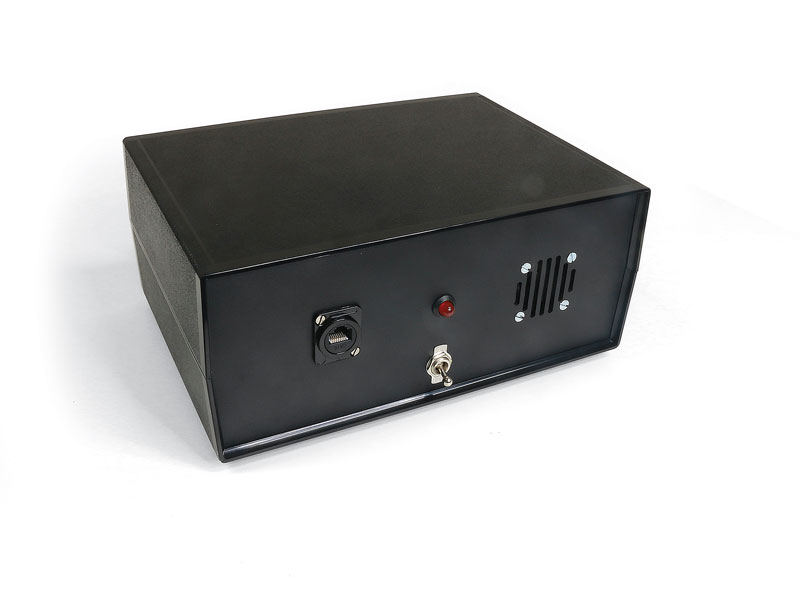
Sherline/Acorn CNC Controller
The Sherline/Acorn CNC Controller is a fully integrated, plug-and-play control designed
for Sherline CNC machines and compatible third-party systems. It combines the industrial
Centroid Acorn CNC control with a custom Sherline housing, wiring, and connectors to
simplify installation, upgrades, and retrofits.
Centroid CNC, founded in 1979 in Howard, PA, produces high-performance, industrial-quality
CNC controls. The Acorn controller is an excellent upgrade for both new and older Sherline
CNC machines, including legacy systems originally supplied to OEMs such as Denford, D&M,
LabVolt, Paxton-Patterson, and Light Machines (Spectralight).
[icon icon=icon-chevron-down size=14px color=#000 ] Controller Features
Custom control housing includes:[icon icon=icon-chevron-down size=14px color=#000 ] Compatibility & Connection Options
[icon icon=icon-chevron-down size=14px color=#000 ] Software & Conversational CAM
A free version of Centroid CNC12 is included with each Acorn kit for initial setup. However, it is strongly recommended that you purchase the Centroid Acorn “Pro” CNC12 Software License to unlock full conversational CAM (Intercon). Use the options below or visit: CLICK HERE for Acorn “Pro” CNC12 Software License details Intercon Conversational CAM:[icon icon=icon-chevron-down size=14px color=#000 ] Typical Use Cases
DIY Customer[icon icon=icon-chevron-down size=14px color=#000 ] Important Notes for Spindle Control
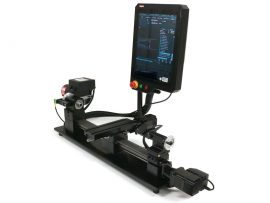
Accu-Pro Turn Ball Screw Lathe with MASSO Touch Controller
This product has been discontinued as of August 2026. This page will be left up for information purposes only.